


WooCommerce account and privacy settings are often left until a site is about to go live, but if guest checkout, automatic account creation, and personal data retention rules aren't properly configured, they'll simultaneously impact conversion rates, customer communication, and compliance handling. This tutorial follows the sequence of the official WooCommerce documentation to clearly explain both checkout experience and data retention in one go.
First decide whether you want faster checkout or more complete account retention.
Guest checkout lowers the barrier for first-time orders, while automatic account creation benefits subsequent repurchases and order lookups. Many stores don't actually have to choose one or the other — you can allow guest checkout while guiding customers to set a password after a successful order, balancing first-time conversions and ongoing customer operations.
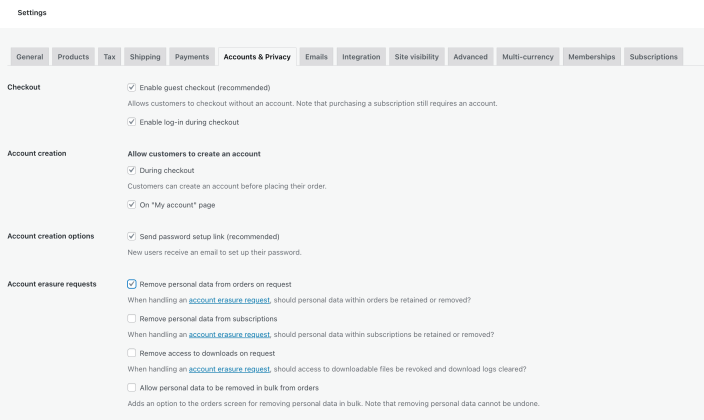
The Account & Privacy settings page centrally configures guest checkout, account creation, and data retention rules. Image source: WooCommerce official documentation screenshot, used for tutorial reference and illustration.
Step 1: Configure guest checkout and account creation rules during ordering
First, judge based on your business whether customers must register. If the store prioritizes quick transactions, guest checkout is usually retained; if customers later need to frequently log in to download materials, view order history, or make wholesale repurchases, then enabling automatic account creation during checkout will be more convenient.
Step 2: Clearly write the privacy notices on the registration page and checkout page
Privacy policy notices are not just for show. They should at minimum align with your actual data usage, such as whether order information is retained, whether it's used for after-sales contact, and whether marketing emails require separate consent. This way, when handling deletion, export, or complaint requests later, there won't be inconsistencies.
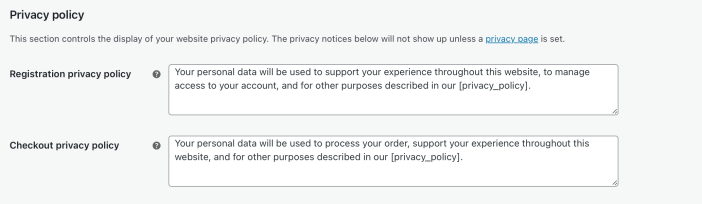
Privacy policy notices should be consistent with the site's actual compliance text during registration and checkout. Image source: WooCommerce official documentation screenshot, used for tutorial reference and illustration.
Step 3: Confirm personal data retention, deletion, and export processes
WooCommerce orders often contain names, phone numbers, addresses, and transaction records. You need to decide how long this data is retained, which data must be kept for tax, after-sales, or risk control purposes, and which requests can be handled through WordPress's personal data export and deletion tools.
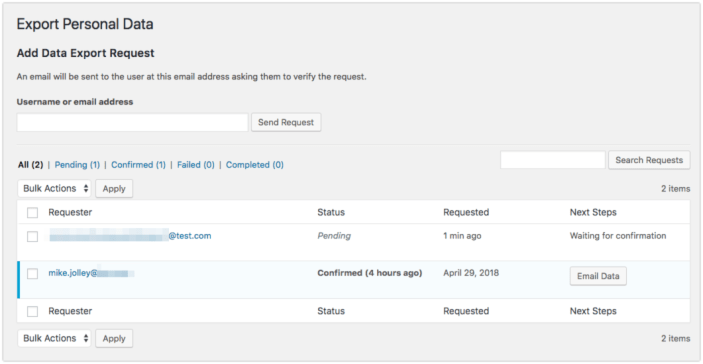
Personal data export and deletion processes should be considered together with the site's privacy commitments and order retention policies. Image source: WooCommerce official documentation screenshot, used for tutorial reference and illustration.
Step 4: Use a real ordering process to check whether the front-end notices flow smoothly
Test at least one guest order, one existing customer order, and one account recovery or order lookup path. If customers see too many obstructive account prompts on the checkout page, conversion rates will suffer; if no account access is provided at all, after-sales inquiries and repurchases become inefficient.
Practical checklist
- Confirmed whether guest checkout is allowed and whether accounts are automatically created during ordering.
- Privacy policy notices on the registration page and checkout page are consistent with actual business practices.
- Order data, inactive accounts, and personal data request retention policies have been determined.
- At least tested guest checkout, existing customer checkout, and order lookup paths.
- Customer service knows how to handle personal data export or deletion requests.
Account and privacy settings directly affect checkout friction and subsequent order communication. After adjusting guest checkout and registration rules, it's recommended to combine Order email notification、Order status handling Test another order; if you haven't set up the basic checkout process, you can go back to WooCommerce basic setup Fill in the key items first.
Frequently asked questions
Is it necessary to disable guest checkout in WooCommerce to be more secure?
Not necessarily. Guest checkout mainly affects the barrier to placing an order, not directly equating to a security risk. What really matters is whether payment, risk control, spam order handling, and the account system are properly designed.
Will automatically creating an account upon placing an order trouble customers?
The key lies in the prompting method. If customers complete payment smoothly first and then receive a clear prompt to activate an account or set a password, the experience is usually smoother than forcing registration before checkout.
Can order data be completely deleted immediately per customer request?
Not necessarily. It also depends on legal or business retention requirements such as taxation, invoicing, after-sales, and anti-fraud. The approach is usually to distinguish data that must be retained from data that can be anonymized or deleted.
Join the discussion
You must log in to post a comment.
After logging in, you can join the discussion. New users can register an account for free.
Do not post spam comments, advertisements, or content with malicious links. Comments must comply with relevant laws, regulations, and community guidelines.