


If a variable product only uses a standard dropdown to display colors and sizes, it can be more difficult for buyers to understand. Color swatches, image swatches, and button options make the product page more intuitive, especially for products with multiple variations like clothing, accessories, home goods, and custom items.
First, set up your WooCommerce variable product correctly
The swatch plugin is only the presentation layer. You still need to create attributes and variations in WooCommerce first, then set prices, stock, SKUs, and images. If the base product isn't set up correctly, even the best-looking swatches will hurt the ordering process.
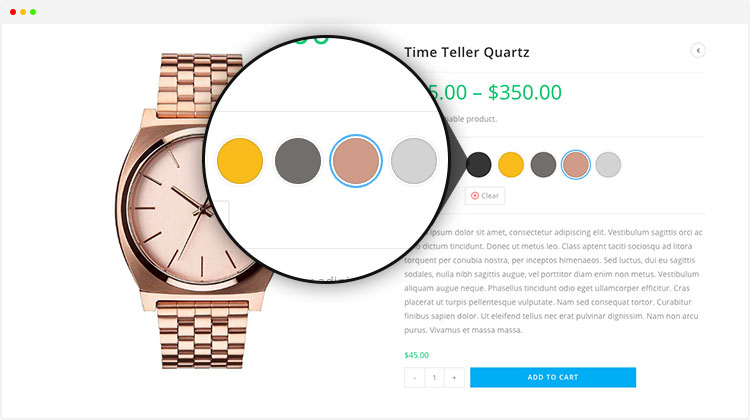
1. What specifications are suitable for swatches
- Color:Suitable for color swatches; clicking switches the product image.
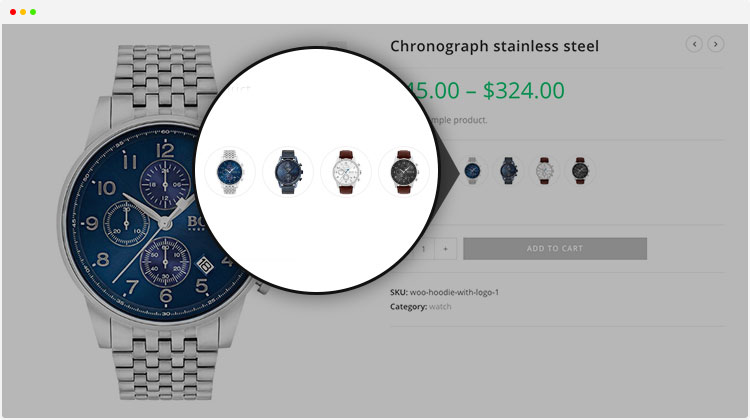
- Pattern/Material:Suitable for image swatches, displaying texture or style.
- Size/Capacity:Suitable for buttons or labels, with clearer text.
2. Product images should switch with the variation
Variation swatches should be used together with variation images. When a buyer selects blue, the main image should switch to the blue product; when selecting wood grain, the image should show that material. Not switching images reduces trust and increases customer inquiries.
3. Tap targets on mobile are very important
Swatches look great on desktop, but mobile is where conversions happen. Each swatch and button needs sufficient touch area, and out-of-stock options should be clearly marked so users don't keep tapping the wrong ones.
If you haven't completed your payment setup yet, feel free to read on PayPal Payments setup tutorial or Stripe payment tutorial。
Checklist
- Keep attribute names and option values consistent.
- Each variation has a price, stock, and SKU.
- Color or image variation can switch the main image.
- Out-of-stock options are clearly disabled or have a notice.
- Tap targets are large enough on mobile.
FAQ
Do all variable products need a swatch plugin?
No. Products with color, material, or pattern are more suitable; simple sizes can also use button styles.
Does a swatch plugin affect speed?
It adds front-end resources, but usually manageable. The key is not to create too many variations, and to combine with caching and image optimization.
Can variation swatches improve SEO?
It is not a direct ranking factor, but it can improve product page experience and conversion. For product page content optimization, refer to A WooCommerce product page SEO checklist。
Final guidance
The goal of variation swatches is to reduce choice cost. First manage attributes, stock, and images well, then use swatches to improve front-end display. The product page will be clearer and conversions more stable.
Join the discussion
You must log in to post a comment.
After logging in, you can join the discussion. New users can register an account for free.
Do not post spam comments, advertisements, or content with malicious links. Comments must comply with relevant laws, regulations, and community guidelines.