


WooCommerce coupons aren’t about offering bigger discounts; the key is clear rules, controllable budgets, and a smooth checkout experience. If your campaign page gets lots of coupon claims but few orders, the problem often isn’t the copy — it’s poorly configured coupon conditions and usage restrictions.
First decide whether this coupon is for acquiring new customers, driving orders, or clearing inventory.
Customer acquisition coupons work better with a minimum spend threshold; order-driving coupons pair well with free shipping; clearance coupons need strict product scope controls. Different purposes require entirely different discount types and expiration dates — don’t improvise the rules right before creating the coupon.
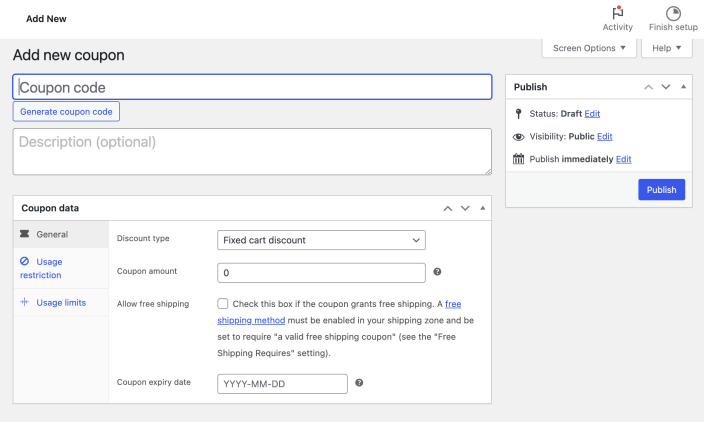
WooCommerce create coupon entry. Image source: WooCommerce official documentation screenshot, used for tutorial reference.
Step 1: Create the coupon and choose a discount type
WooCommerce supports fixed cart discounts, fixed product discounts, and percentage discounts. If your product prices vary widely, percentage discounts feel more natural; if you need budget control, fixed amounts are usually easier to estimate.
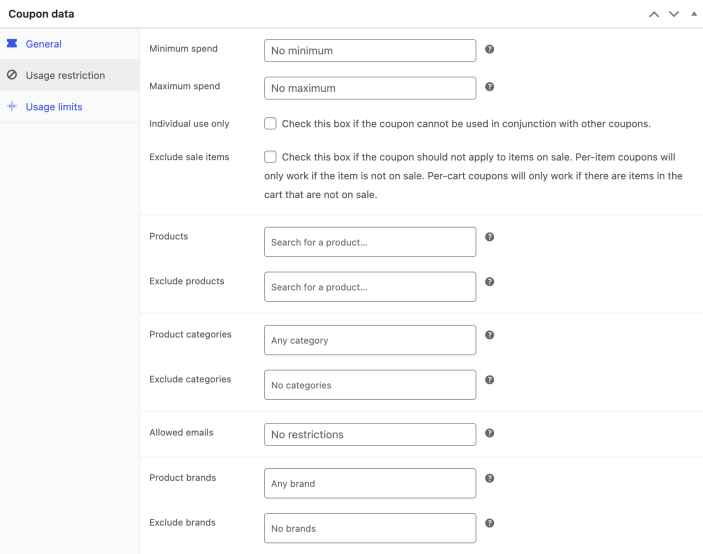
Usage restrictions control minimum spend, allowed products, and allowed emails. Image source: WooCommerce official documentation screenshot, used for tutorial reference.
Step 2: Configure usage restrictions
Minimum spend, excluding sale items, restricting to specific categories, and allowing specific emails are the most commonly used and practical settings. This step determines whether the coupon is a public campaign coupon or a targeted coupon for specific customers.
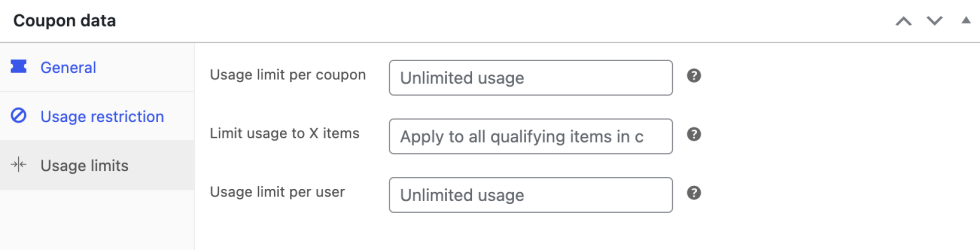
Usage limits determine the campaign budget and the risk of abuse. Image source: WooCommerce official documentation screenshot, used for tutorial reference.
Step 3: Set usage limits and expiration date
Coupons without usage caps and expiration dates can easily continue to circulate after the campaign ends. If you're running ads or giving KOLs exclusive codes, it's even more important to limit usage per user to prevent things from getting out of control once shared in communities.
Step 4: Thoroughly test the cart and checkout flow
When testing, don’t just check if the coupon can be applied successfully — also verify the discount amount, free shipping integration, order email display, and backend reports. If your campaign page promises “free shipping on orders over 99, plus an extra 10 off,” the backend rules must execute in that exact sequence.
Pre-launch checklist
- The coupon has a clear goal: acquiring new customers, driving orders, or clearing inventory.
- The discount type matches the product price structure.
- Usage restrictions cover minimum spend, applicable categories, and sale item exclusions.
- Validity period, total usage limit, and per-user limit have all been filled in.
- Campaign page copy, shopping cart discount, and order email are consistent.
Before the coupon actually goes live, put it into the complete purchase flow for checking: first confirm the product price and inventory in Product editor have no conflicts, then use Shipping zones、Free shipping conditions and the checkout page to run a test order, avoiding discount, free shipping, and minimum spend conditions clashing with each other.
Frequently asked questions
Which is better: fixed amount or percentage discount?
When product price differences are large, percentage is more natural; when you need precise budget control or to promote a cart threshold, fixed amount is easier to manage.
Why can't the coupon be combined with free shipping?
Usually it's because the free shipping rule exists independently, or the coupon doesn't have the "allow free shipping" option checked. You need to check the restrictions on both the shipping method and the coupon.
Should new and existing customers share the same coupon?
Not recommended. New-customer acquisition coupons and repeat-purchase coupons usually have different thresholds, applicable categories, and discount levels. Splitting them makes it easier to evaluate the actual conversion effect.
Join the discussion
You must log in to post a comment.
After logging in, you can join the discussion. New users can register an account for free.
Do not post spam comments, advertisements, or content with malicious links. Comments must comply with relevant laws, regulations, and community guidelines.